Nintendo eShop Gift Cards
Buy Nintendo eShop Gift Cards online in Bangladesh – instant digital codes for Nintendo Switch with secure local payments.

About Nintendo eShop Gift Card
What is a Nintendo Gift Card?
A Nintendo eShop Card is a simple and convenient way to add funds to your account. With it, you can easily purchase games, DLC, and other digital content for your Switch. Nintendo originally began as a handmade playing card company. In 1977, the company made a major shift by releasing its first home video game console. Today, Nintendo remains one of the most popular and innovative names in the gaming industry.
Nintendo Switch Online
A Nintendo eShop Gift Card can also be used to start a Nintendo Switch Online membership. Here are some of the key benefits of subscribing:
Online Play
Play online with friends or compete against players worldwide in games like Mario Kart and Super Smash Bros. Ultimate.
Nintendo Entertainment System – Nintendo Switch Online
Enjoy classic NES titles with newly added online features. New games are added regularly.
Save Data Cloud
Your save data is backed up automatically, so you can access and restore it anytime when needed.
Smartphone App
Enhance your gaming experience with the mobile app, which allows voice chat while playing supported online games.
Special Offers
Access exclusive member discounts and purchase select limited-edition products.
Region Settings
Make sure to choose the correct region before redeeming your Nintendo eShop Gift Card code.
Please note: Any remaining Nintendo eShop balance will not transfer if you change the country setting on your Nintendo Account. You must use the remaining funds before switching regions.
How to change your Nintendo region?
1. On your console, go to Settings from the main menu and follow the region selection options.
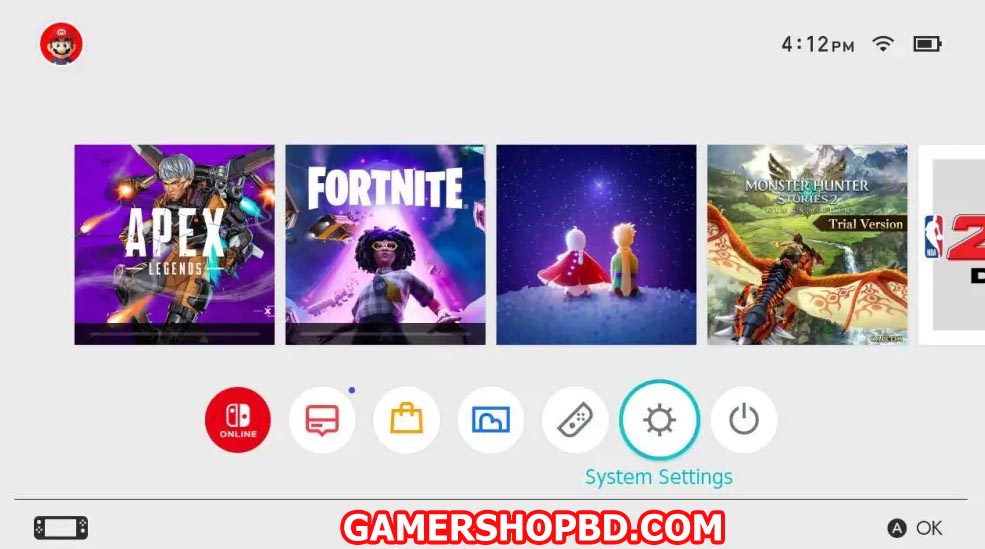
2. Look for the “System” at the very bottom and select “Region.”
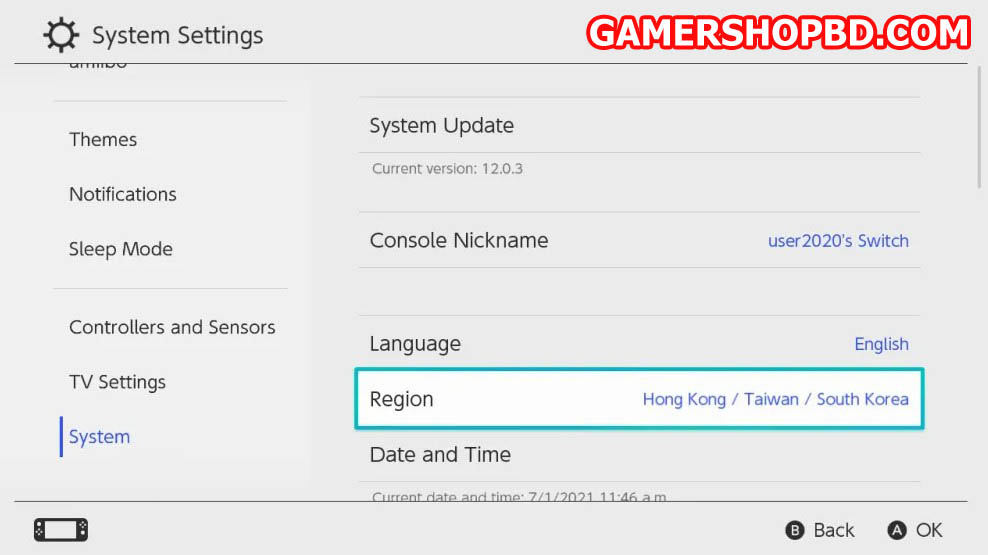
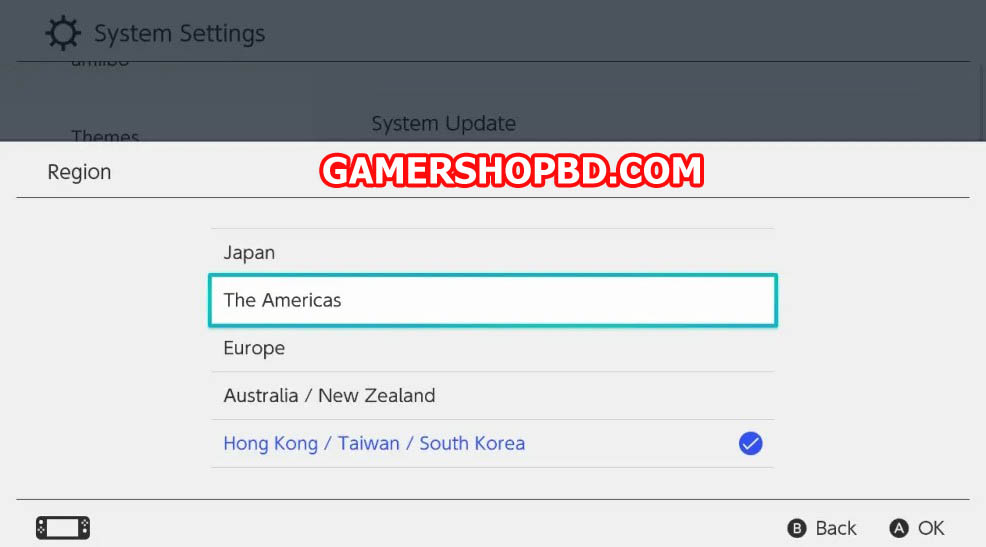
3. Select your “Region”.
4. Press “Next”.
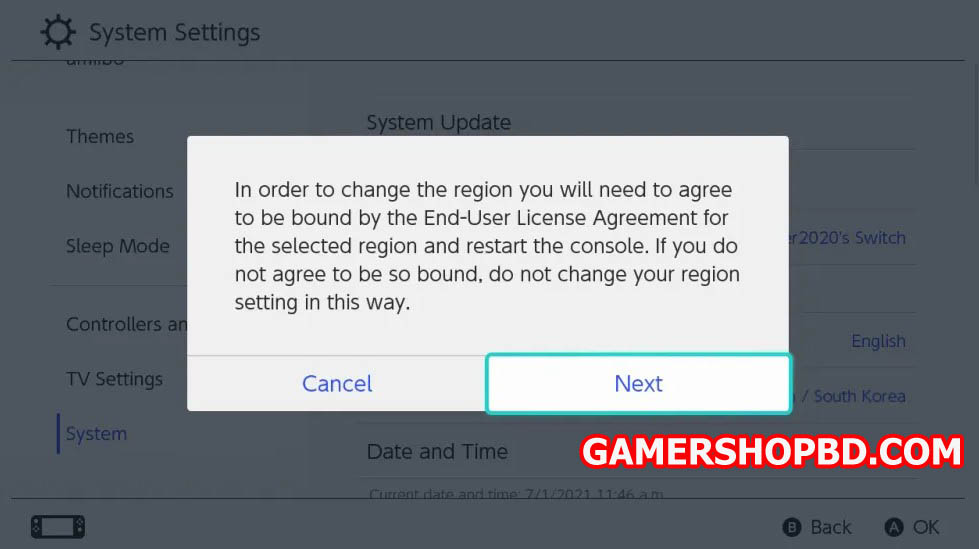
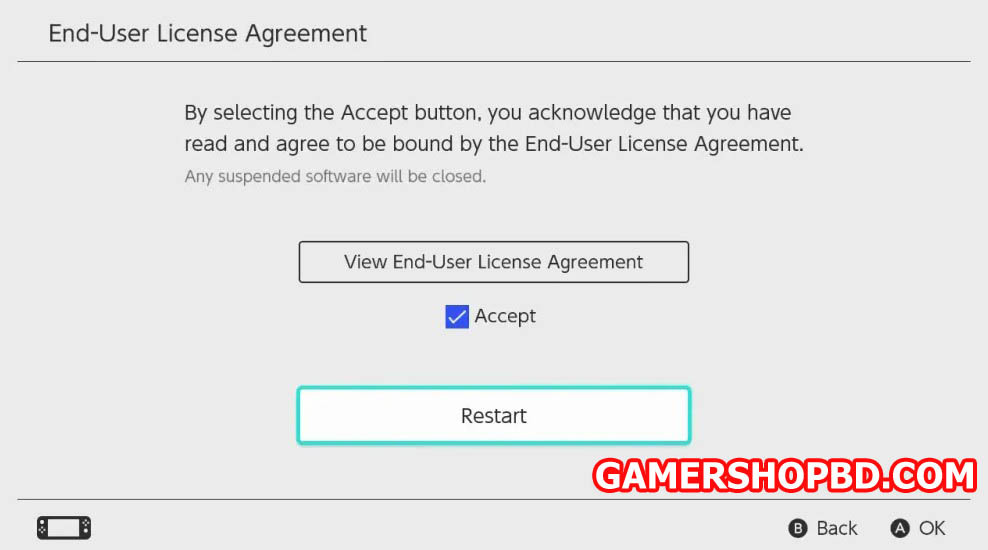
5. Finally, select “Accept” and then “Restart” your console.
How to redeem a Nintendo eShop Gift Card?
Select the Nintendo eShop icon from the HOME menu.
Scroll to the left and choose “Add Funds.”
Select “Redeem a Nintendo eShop Card.”
Enter the 16-character activation code, then select “OK” to finish the process.
FAQ’s about Nintendo eShop Cards
Do Nintendo eShop Gift Cards expire?
No, Nintendo eShop Gift Cards do not expire and can be redeemed at any time.
Are Nintendo eShop Cards region-locked?
Yes, Nintendo eShop Gift Cards are region-locked according to the currency printed on the card. They can only be redeemed in countries that use the same currency. For example, if you purchase an eShop code in USD, you can redeem it only in regions that accept USD. Make sure your account’s region matches the card’s currency.
What can I buy with Nintendo eShop credit?
You can access thousands of games and digital content when you add funds to your Nintendo account. Discover fan favorites like Super Mario, The Legend of Zelda, Animal Crossing, Pokémon, and Metroid, along with a wide selection of indie titles and timeless classics. You can also purchase DLC and season passes using your prepaid balance. All content is available through the Nintendo eShop for devices like the Nintendo Switch and Nintendo Switch Lite.
How to use a Nintendo Card?
It’s simple! Select the Nintendo eShop icon from the HOME menu on your Switch. Choose “Enter Code” on the left side of the screen and type in the activation code you received from us. Select “OK,” and the funds will be added to your account. For additional redemption methods, visit Nintendo’s official support website.
Can I use my eShop Card more than once?
No, each eShop Card can only be redeemed once. The full value is transferred to your Nintendo account upon redemption. The funds remain available until your balance is fully used.
How do I check my eShop Card balance?
On Nintendo Switch:
Open the Nintendo eShop from the “HOME” menu.
Select the user profile linked to your account.
Your available balance will appear in the top-right corner of the screen.
On a web browser:
Go to the official Nintendo Account website.
Sign in to your account.
Open the “Shop Menu” to see your current eShop balance.
Be careful not to accidentally redeem a code while checking your balance.
Can I use the Nintendo Card for Nintendo Switch Online?
Yes, you can redeem your eShop Card online and use the credit to purchase a Switch Online subscription.
Which devices support a Nintendo Gift Card?
A Nintendo Gift Card works with the Nintendo Switch and Nintendo Switch Lite. Older Nintendo devices are not supported.
How do I contact Nintendo customer service?
Visit the Nintendo support page for assistance, and select your preferred method to get in touch with them.